


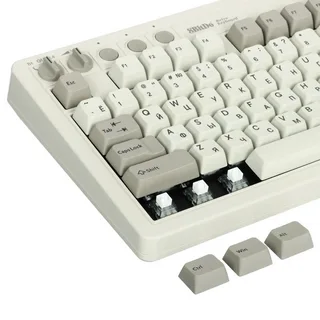
Choosing the right keyboard layout can significantly improve your efficiency, comfort, and workflow. While many people focus on switches and build quality, the layout of a keyboard also plays a crucial role in how productive you can be. Understanding the Best Mechanical Keyboard Layouts for Productivity helps users select a keyboard that matches their typing habits, workspace needs, and daily tasks.
In this article, we will explore the most popular mechanical keyboard layouts and how each one contributes to productivity.
Why Keyboard Layout Matters for Productivity
Keyboard layout determines the number of keys, spacing, and overall size of your keyboard. A well-chosen layout can reduce hand movement, improve typing speed, and keep essential keys within easy reach.
When selecting among the Best Mechanical Keyboard Layouts for Productivity, it’s important to consider factors such as desk space, the type of work you do, and how frequently you use certain keys like the number pad or function row.
Full-Size Layout (100%)
Ideal for Data Entry and Office Work
The full-size keyboard layout includes all standard keys: the alphanumeric section, function row, navigation cluster, and number pad. This layout is especially useful for professionals who work with spreadsheets, accounting software, or large sets of numerical data.
Key Productivity Benefits
- Dedicated number pad for fast calculations
- Full navigation keys for editing documents
- No need for key combinations or layers
For users whose workflow relies heavily on numbers, this is often considered one of the Best Mechanical Keyboard Layouts for Productivity.
Tenkeyless Layout (TKL – 87%)
Perfect Balance Between Size and Function
Tenkeyless keyboards remove the number pad while keeping the function row and navigation keys. This design reduces the keyboard’s width, allowing your mouse to be positioned closer to your typing area.
Productivity Advantages
- Saves desk space
- Improves ergonomic mouse positioning
- Keeps important keys like arrows and function row
Many programmers, writers, and office workers prefer this layout because it offers a compact design without sacrificing essential functionality.
75% Layout
Compact Yet Highly Functional
The 75% keyboard layout compresses the keys together while keeping the function row and arrow keys. It offers nearly the same functionality as a Tenkeyless keyboard but in a smaller footprint.
Why It Boosts Productivity
- Efficient use of desk space
- Easy access to essential keys
- Minimal hand movement
Because it balances compactness and functionality, many professionals consider it among the Best Mechanical Keyboard Layouts for Productivity.
65% Layout
Minimal Design With Essential Keys
A 65% keyboard removes the function row but retains arrow keys and a few navigation buttons. It is popular among users who want a clean desk setup while still keeping important keys accessible.
Productivity Highlights
- Smaller desk footprint
- Faster reach between keyboard and mouse
- Simple and efficient layout
This layout works well for writers, developers, and everyday office tasks that don’t require frequent use of function keys.
60% Layout
Ultra-Compact for Maximum Desk Space
The 60% keyboard is one of the smallest mainstream layouts. It removes the function row, navigation cluster, and number pad, relying on key combinations instead.
Productivity Considerations
- Extremely portable
- Great for minimal setups
- Requires learning shortcut layers
Although it may take some time to adapt, experienced users can work quickly once they master the key layers.
Choosing the Right Layout for Your Workflow
Selecting the Best Mechanical Keyboard Layouts for Productivity ultimately depends on how you work. If your job involves frequent number input, a full-size keyboard may be the best choice. If you prefer a clean desk and more mouse space, a Tenkeyless or 75% keyboard could be ideal.
Writers, programmers, and remote workers often lean toward compact layouts because they reduce hand movement and create a more ergonomic setup.
Conclusion
Finding the Best Mechanical Keyboard Layouts for Productivity requires understanding your daily tasks, workspace, and typing preferences. From full-size keyboards designed for data-heavy tasks to compact 60% layouts perfect for minimalist setups, each option offers unique advantages.
